KYY X90E: Two Extra Screens for One Laptop
At a glance
Three things tell you if it fits
- What it is
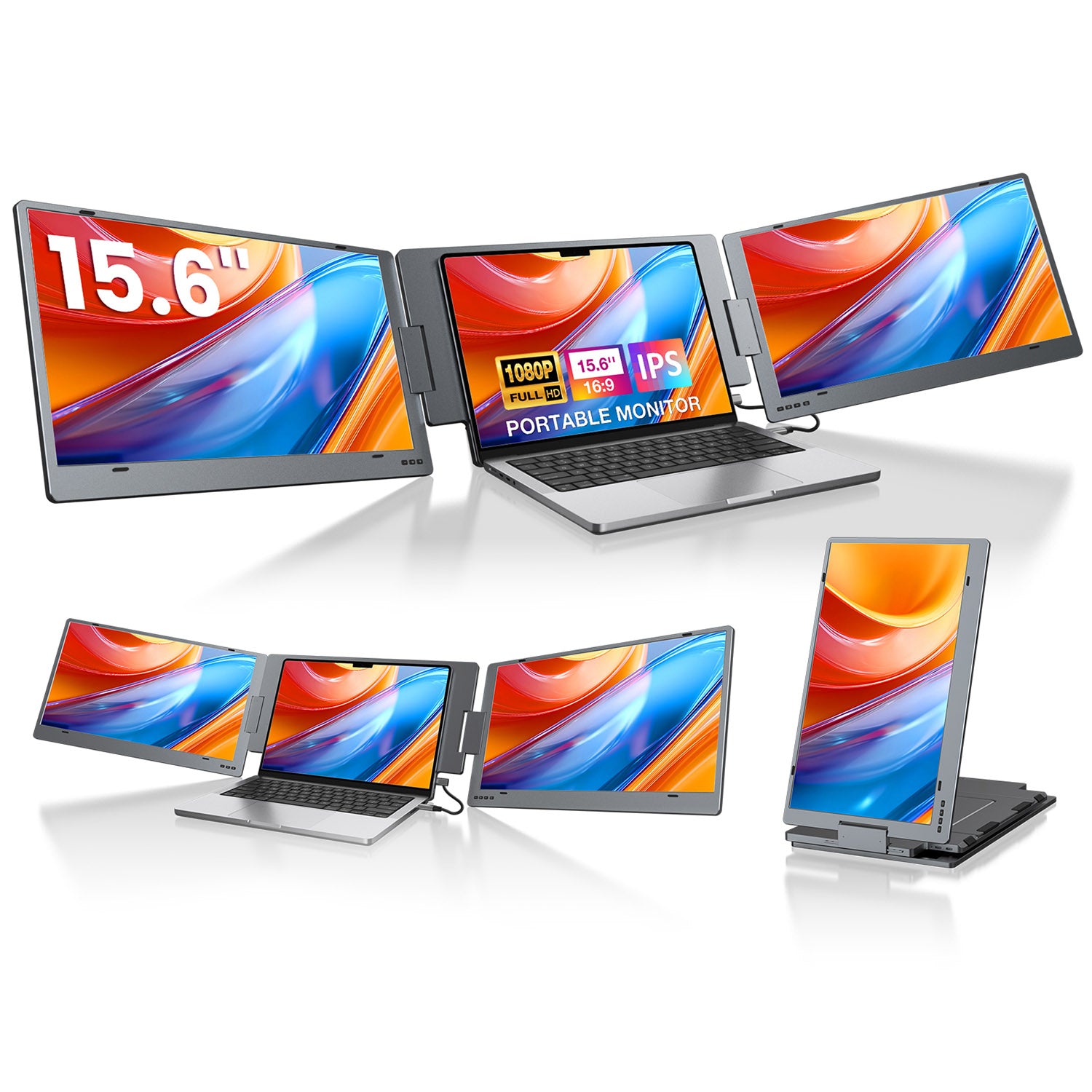
Two 15.6-inch FHD displays unfold beside a Windows laptop and run from one compatible USB-C connection without a driver.
- Best fit
Choose it for a Windows laptop when two large side screens matter more than carrying an additional 4.85 lb, and the USB-C port supports video output.
- Know this first
This exact X90E is Windows-only. It is not the safe choice for a MacBook.
Open the full guideHow it works · checked reviews · important limits
The appeal is seeing three jobs at once
Open the laptop and two more screens unfold beside it. Keep the main work in the middle, references on one side, and a call or messages on the other. The buying decision comes down to port and operating-system compatibility, plus the added carry weight.
A two-panel extender turns one laptop into three displays without claiming a permanent desk. It is useful for people who repeatedly switch among a main task, source material, messages, and calls—but these are extra displays, not independent tablets or computers.
A spreadsheet can stay in the middle, its source documents on the left, and messages or a call on the right. Video editing, coding, accounting, research, and remote work all benefit from seeing the next piece of information without covering the first one.
KYY and Xebec add a display to each side of the laptop. ASUS is a lighter, separate one-screen alternative.
The port must send a video signal. A USB-C port that only charges the laptop cannot run these screens by itself.
KYY X90E is Windows-only. Every MacBook Air and Pro needs Xebec's separate Mac Adapter and a one-time DisplayLink driver installation.
Check these five things before you buy
Number of screens
- What it does
- KYY and Xebec add two screens. ASUS adds one.
- Where it helps
- Three total displays keep a main task, references, and communication visible at the same time.
- Know this first
- The extra panels are monitors only. They do not run apps without the laptop.
USB-C video
- What it does
- A full-feature USB-C port carries the picture and may also carry power through one cable.
- Where it helps
- One-cable setup is the cleanest way to use an extender away from a permanent desk.
- Know this first
- Charging-only USB-C is not enough. Check the laptop manual for DisplayPort Alt Mode or Thunderbolt support.
Windows or Mac
- What it does
- Compatibility determines whether the laptop can send separate pictures to all three screens.
- Where it helps
- The right model opens a true extended desktop instead of repeating the same picture.
- Know this first
- KYY X90E is Windows-only. Xebec supports more systems, but MacBooks require its adapter and driver.
Weight and support
- What it does
- The frame holds the side panels around the laptop while a kickstand carries their weight.
- Where it helps
- It folds into a travel setup without building a permanent monitor desk.
- Know this first
- KYY weighs 4.85 lb and Xebec 3.6 lb. Use the stand; do not ask the laptop hinge to carry all of it.
One-screen alternative
- What it does
- A separate portable monitor stands beside the laptop instead of hanging from the lid.
- Where it helps
- ASUS weighs about 1.98 lb, stands on its own, and can also work over USB-A with its DisplayLink driver.
- Know this first
- You get two screens total, not three, and the separate display needs its own desk space.
The most portable-looking option can be the heaviest thing in the bag
KYY gives Windows users two large 15.6-inch side screens, but the extender alone weighs 4.85 lb. Xebec is lighter and supports more operating systems, but every MacBook still needs its separate adapter and DisplayLink driver.
If one extra screen solves the problem, ASUS is about 1.98 lb and does not hang from the laptop lid. You give up the three-screen layout, but the bag is lighter and the laptop hinge carries less strain.
Models to compare
Choose two attached screens or one lighter separate screen
TWO 15.6-INCH SCREENS · WINDOWS
KYY X90E
Two 15.6-inch side screens · Windows onlyTwo 15.6-inch FHD displays unfold beside a Windows laptop and run from one compatible USB-C connection without a driver.
Choose it for a Windows laptop when two large side screens matter more than carrying an additional 4.85 lb, and the USB-C port supports video output.
See details · features and trade-offs
Key features
- Extra screens
- Two 15.6-inch FHD IPS panels
- Compatibility
- Windows only · 12–17-inch laptops
- Connection
- One full-feature USB-C · no driver
- Amazon path
- LIANJI Tech. · ships from Amazon
Before you buy
- This exact X90E is Windows-only. It is not the safe choice for a MacBook.
- At 4.85 lb, the extender can weigh more than some laptops. Use the built-in stand instead of asking the laptop hinge to carry it.
- One cable works only when the USB-C port carries video. A charging-only USB-C port is not enough.

TWO 13.3-INCH SCREENS · WINDOWS AND MAC SUPPORT
Xebec Tri-Screen 3
Two 13.3-inch screens · Windows, Mac, Linux, ChromeOSTwo 13.3-inch FHD screens, a one-cable frame, and up to 60 W charging for the laptop while the screens are connected.
Choose it when you need two side screens across Windows, macOS, Linux, or ChromeOS and can use the required adapter and driver on a MacBook.
See details · features and trade-offs
Key features
- Extra screens
- Two 13.3-inch FHD IPS panels
- Compatibility
- Windows · Mac · Linux · ChromeOS · 13–18-inch laptops
- Connection
- Embedded USB-C · can power the laptop at up to 60 W while connected
- Amazon path
- Xebec Inc · ships from Amazon
Before you buy
- Every MacBook Air and Pro needs Xebec's separate Mac Adapter plus a one-time DisplayLink driver installation.
- The screens are 13.3 inches, smaller than KYY's 15.6-inch panels.
- At 3.6 lb it is lighter than KYY, but still a heavy screen to carry in a travel bag.
ONE 15.6-INCH SCREEN · ABOUT 1.98 LB
ASUS ZenScreen MB16ACV
One 15.6-inch portable screenIt adds one 15.6-inch FHD screen instead of two, stands on its own, and weighs about 1.98 lb.
Choose it when one extra document, chat, or preview screen solves the problem and you would rather carry less weight and avoid loading the laptop hinge.
See details · features and trade-offs
Key features
- Extra screens
- One 15.6-inch FHD IPS panel
- Weight
- About 1.98 lb
- Connection
- USB-C or USB-A hybrid signal
- Amazon path
- Exact model · check current seller and fulfillment
Before you buy
- It gives you two screens total, not the three-screen setup shown by KYY and Xebec.
- It stands beside the laptop instead of attaching to the lid, so it needs its own desk space.
- The monitor has no built-in speaker. Its job is simply to add a lightweight screen.
What should we look at next?

Sources
As an Amazon Associate, we earn from qualifying purchases.
Amazon and the Amazon logo are trademarks of Amazon.com, Inc. or its affiliates.